
首先我们来看一个代码:
<div id=”layer1″ style=”margin:20px; border:1px solid #F88; width:400px; “> <div id=”layer2″ style=”position:absolute; background-color:#ccc;”>Absolute (layer2)</div> <div id=”layer3″ style=”margin:30px auto; width:200px; height:80px; background-color:#36F;”>Normal Text Content (layer3)</div> </div>
这个代码的效果如下:
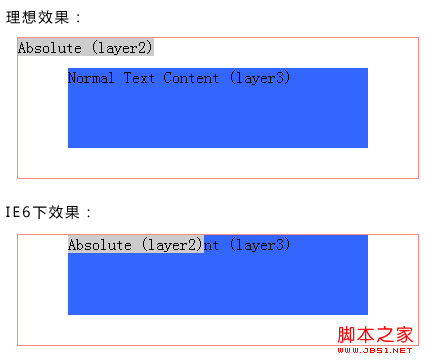
在FF和IE8下都没有任何问题的,但是在IE6和IE7下有人如下两个bug:
a, 绝对定义(position:absolute)的相邻元素margin-top失效,但如果相邻元素(layer3)去掉width属性,margin-top又会生效。 b, layer1无法靠左,距离左边的距离为layer1的第一个非绝对定义元素(layer3)的margin-left值。 解决方法:
1,添加代码:<!–[if lte IE 7]><div></div><![endif]–>,这也是网上找到的能够完全解决问题的方法。即代码变为:
<div style=”margin:20px; border:1px solid #F88; width:400px; “> <div style=”position:absolute; background-color:#ccc;”>Absolute (layer2)</div> <!–[if lte IE 7]><div></div><![endif]–> <div style=”margin:30px auto; width:200px; height:80px; background-color:#36F;”>Normal Text Content (layer3)</div> </div>
2,外围元素加position:relative定义,绝对定义元素加left和top定义。此方法可以解决第二个bug,无法解决第一个bug。也有说法用padding-top替代margin-top的,但是有时可以这样,有时候毕竟不行的。代码为:
<div style=”margin:20px; border:1px solid #F88; width:400px; position:relative”> <div style=”position:absolute; background-color:#ccc; left:0; top:0;”>Absolute (layer2)</div> <div style=”margin:30px auto; width:200px; height:80px; background-color:#36F;”>Normal Text Content (layer3)</div> </div>
3,这是本文所要阐述的方法,相对来说比较完美一些。给绝对定义元素添加“background-color:#CCC; float:left; display:inline;”定义,背景色千万不可以去掉,如果没有背景色就加一个透明(background-color:transparent;)。即代码变为:
<div style=”margin:20px; border:1px solid #F88; width:400px;”> <div style=”position:absolute; background-color:#ccc; float:left; display:inline;”>Absolute (layer2)</div> <div style=”margin:30px auto; width:200px; height:80px; background-color:#36F;”>Normal Text Content (layer3)</div> </div>
纠结了两天,时刻都在思考这个问题的解决思路,总算解决了。感谢桃子。
【IE6/IE7下绝对定位position:absolute和margin的冲突问题解决】相关文章:
★ IE6/7下多种方法移除button、input 默认边框和去掉焦点线
★ 详解PNG图片
★ position:fixed或absolute时百分比参考屏幕宽度