
教你如何用C#制作文字转换成声音程序
在System.Speech命名空间下,SpeechSynthesizer类可以把文字读出来,一起来玩下~~
首先在Windows窗体项目中引入System.Speech。界面部分:
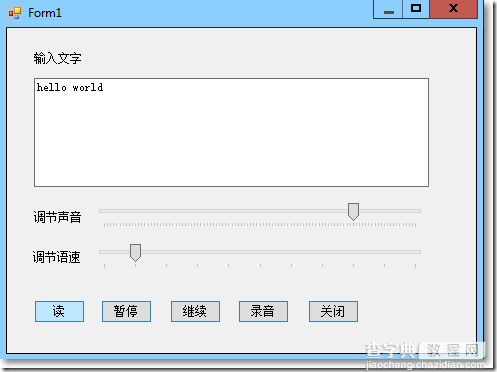
后台代码也很简单,只不过调用了SpeechSynthesizer类的一些方法:
using System.Windows.Forms; using System.Speech; using System.Speech.Synthesis; namespace WindowsFormsApplication1 { public partial class Form1 : Form { private SpeechSynthesizer ss; public Form1() { InitializeComponent(); } private void Form1_Load(object sender, EventArgs e) { ss = new SpeechSynthesizer(); } private void buttonRead_Click(object sender, EventArgs e) { ss.Rate = trackBarSpeed.Value; ss.Volume = trackBarVolumn.Value; ss.SpeakAsync(txtMsg.Text); } private void buttonPause_Click(object sender, EventArgs e) { ss.Pause(); } private void buttonContinue_Click(object sender, EventArgs e) { ss.Resume(); } private void buttonRecord_Click(object sender, EventArgs e) { SpeechSynthesizer ss = new SpeechSynthesizer(); ss.Rate = trackBarSpeed.Value; ss.Volume = trackBarVolumn.Value; SaveFileDialog sfd = new SaveFileDialog(); sfd.Filter = "Wave Files|*.wav"; ss.SetOutputToWaveFile(sfd.FileName); ss.Speak(txtMsg.Text); ss.SetOutputToDefaultAudioDevice(); MessageBox.Show("完成录音~~","提示"); } private void buttonClose_Click(object sender, EventArgs e) { Application.Exit(); } } }
【教你如何用C#制作文字转换成声音程序】相关文章: